
System Care Antivirus: what it is and how to remove it
System Care Antivirus is a rough security software that delivers fake alerts and system scans in order to promote paid version of the program. However, buying the license only leads to the waste of money, because this tool cannot fix your computer and remove viruses.
Facts checked October 6, 2026. Removal steps tested on Windows 11 (26H2) and checked against Microsoft's and the browser makers' current documentation. Sections marked as our earlier report are the original text: they describe the threat as it was then and have not been reviewed since. The 2026 status, the removal steps and the questions are current.
Automatic
Get a free scan and check if your PC is infected.
Fortect finds malware, unwanted programs and the Windows damage they leave behind, and repairs it in one pass.
If GoogleUpdate.exe returns after removal, a full scan can find the entry that brings it back.
Do it yourself · free Remove System Care Antivirus yourself 5 steps, about 15 minutes, no software needed.
Start the steps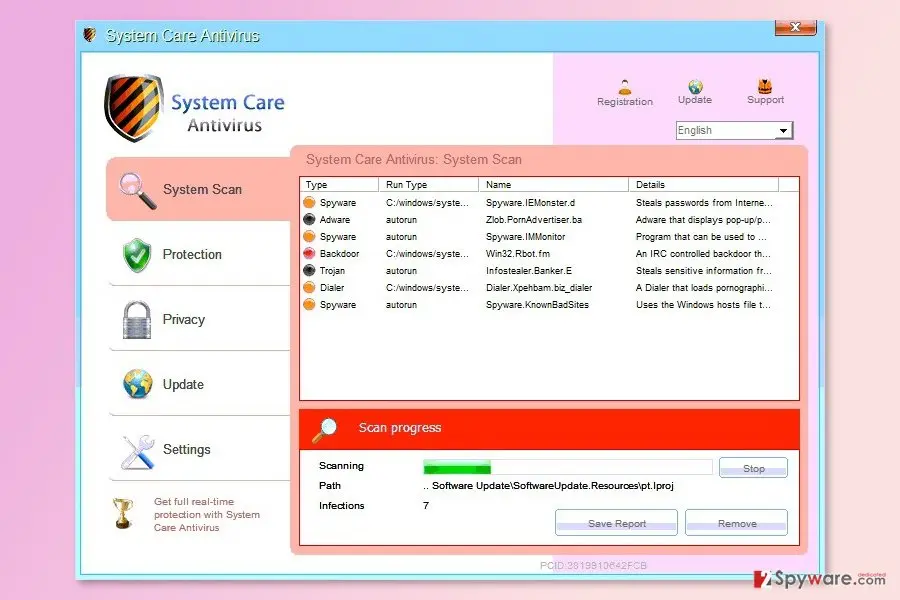
System Care Antivirus: summary
| Detection names | No Microsoft detection name is known |
|---|---|
| Distribution | Not recorded in the old report |
| Damage | Not recorded in the old report |
| Name | System Care Antivirus |
| Type | Rogue antivirus |
| Symptoms | An unknown process in Task Manager |
| Removal | Scan the PC with security software to find and remove the malware and anything installed with it. Fortect scans Windows for malware and repairs the system files and settings it damaged. Remove it nowTo use the full-featured product, you have to purchase a license for Fortect. The scan is free. |
Show 4 more facts
| Files and processes | GoogleUpdate.exe |
|---|---|
| Evidence | 6 write-ups by security sites; details still limited |
| First seen | 14 August 2017 |
| Facts checked | 6 October 2026 |
Is System Care Antivirus a real security program?
- File:
GoogleUpdate.exe
From our report of Aug 2017 · not reviewed since
Obtaining System Care Antivirus license won't help to clean your PC from viruses
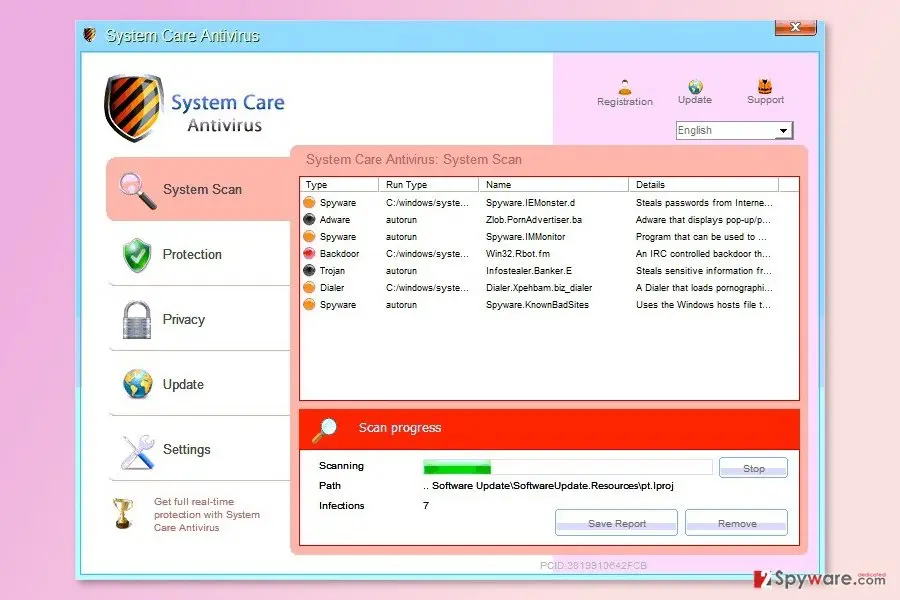
System Care Antivirus is a rough security software that delivers fake alerts and system scans in order to promote paid version of the program.
However, buying the license only leads to the waste of money, because this tool cannot fix your computer and remove viruses.
System Care Antivirus can also be found as System Care Antivirus 3.7.33. It might infiltrate the computer silently. The program has already caused lots of inconveniences for computer users in Australia, Canada, and France.
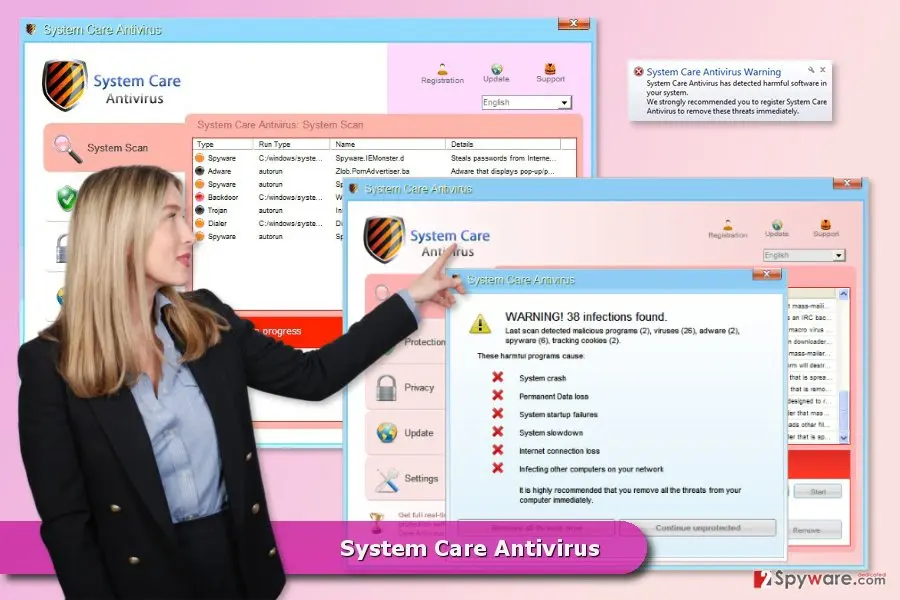
Once SystemCareAntivirus gets inside the system, this virus tries to make itself perfectly comfortable there and modifies some of its parameters. As a result, it gets the ability to start every time you reboot your computer and begins scanning the system and displaying its fake alerts, such as:
This virus is just another version of AVASoft Professional Antivirus, Disk Antivirus Professional and many other viruses that have been spread by hackers previously. They all share the same GUI and also rely on the same marketing strategy, which is based on fake alerts and scanners. You can safely ignore these notifications, and you should remove System Care Antivirus without any delay.
It's a real and professional security software that can protect you PC from cyber threats and clean all potentially dangerous entries.
From our report of Aug 2017 · not reviewed since
More from our earlier report on System Care Antivirus
- System Care Antivirus Warning Your PC is still infected with dangerous viruses.
- The file GoogleUpdate.exe is infected.Please activate your antivirus software.
- The site you are trying visit may harm your computer!
- Your security setting level puts your computer at risk!
- Activate System Care Antivirus, and enable safe web surfing (recommended).Ignore warnings and visit that site in the current state (not recommended).
How System Care Antivirus got on your PC
From our report of Aug 2017 · not reviewed since
The program spreads with the help of ZeroAccess rootkit and Black Hole Exploit Kit.
Therefore, it might enter the system without your knowledge. However, you can avoid this from happening by protecting your PC with professional security tool and keeping all your programs updated.
You can get infected with it if you tend to visit illegal websites, download freeware, open spam or fall for fake alerts that typically ask to update your outdated Flash Player in order to watch something online. As soon as you click on such warning, you download Trojan horse, which additionally downloads malicious files that belong to System Care Antivirus virus.
How to remove System Care Antivirus
Nothing it reports is real.
These steps remove it and undo a payment if you made one.
Step 1: Do not pay, and undo a payment if you made one
Nothing that System Care Antivirus says it found needs fixing by it. Close its windows and do not enter card details.
If you bought it, contact your bank or card issuer about a dispute and cancel any renewal, keeping the receipt e-mail as evidence. Uninstalling it from Windows 11 or Windows 10 removes the program but leaves the subscription running.
Full procedure with screenshots: What to do after paying a scammer
Step 2: Uninstall programs you did not mean to install
System Care Antivirus rarely comes alone: it is usually installed by, or together with, a free program. In Windows 11 open Settings > Apps > Installed apps, in Windows 10 Settings > Apps > Apps & features, and sort by install date.
Uninstall every entry from the day the trouble began that you did not install on purpose, for example a download manager, a converter or a browser you never chose.
Keep drivers and entries from Microsoft, Intel, AMD, NVIDIA or your PC's maker unless you are sure.
Full procedure with screenshots: Uninstall a program or app in Windows On uGetFix
Step 3: Remove it from startup
Press Ctrl + Shift + Esc to open Task Manager and select Startup apps (Windows 11) or the Startup tab (Windows 10). Disable entries you do not recognise, especially ones with no publisher or with a name that copies a Windows component.
Right-click an entry and choose Open file location to see where it runs from: programs in
%AppData%or%Temp%deserve a closer look. Some entries are not listed there but in the registry Run keys, which the procedure below shows how to check.Full procedure with screenshots: Stop apps from opening at startup On uGetFix
Step 4: Delete the folders left behind
Uninstalling often leaves the program's folders, and some threats reinstall themselves from them.
Press Windows + R, type
%LocalAppData%and press Enter, then do the same for%AppData%and %ProgramData%, and look for folders named after System Care Antivirus, its publisher or created on the day the problem started.Delete those folders, and check
C:\Program FilesandC:\Program Files (x86)too.If Windows says a file is in use, end it in Task Manager or delete the folder after a restart in Safe Mode. The folders are the same in Windows 11 and Windows 10.
Full procedure with screenshots: Remove what malware leaves behind in Windows
Step 5: Scan the PC, then run the offline scan
A scan finds the parts of System Care Antivirus that the manual steps cannot see. In Windows Security > Virus & threat protection > Scan options, start a Full scan and quarantine what it reports.
Follow it with Microsoft Defender Antivirus (offline scan) > Scan now, which restarts the PC and checks the disk while Windows and the malware are not running.
It takes about 15 minutes and works the same in Windows 11 and Windows 10. If either scan finds something, run the full scan again after removal until it comes back clean.
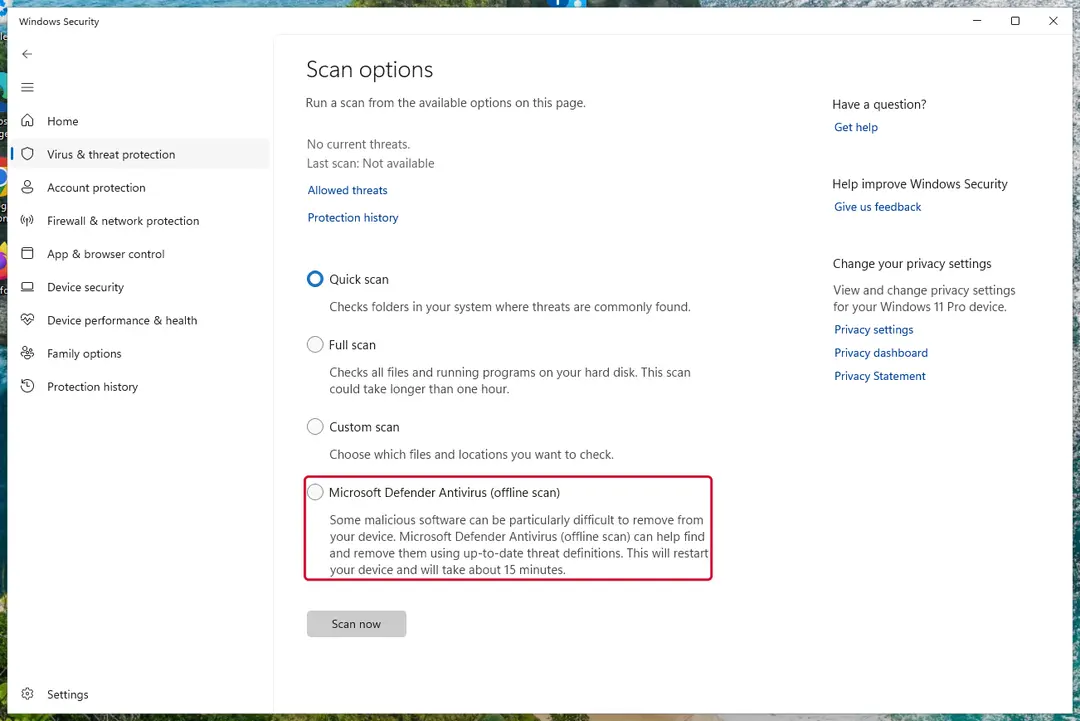
Windows 11: Windows Security > Virus & threat protection > Scan options. Full procedure with screenshots: Run a Microsoft Defender Offline scan
Choose a proper web browser and improve your safety with a VPN tool
Online spying has got momentum in recent years and people are getting more and more interested in how to protect their privacy online.
One of the basic means to add a layer of security - choose the most private and secure web browser. Although web browsers can't grant full privacy protection and security, some of them are much better at sandboxing, HTTPS upgrading, active content blocking, tracking blocking, phishing protection, and similar privacy-oriented features.
However, if you want true anonymity, we suggest you employ a powerful VPN - it can encrypt all the traffic that comes and goes out of your computer, preventing tracking completely.
Lost your files? Use data recovery software
While some files located on any computer are replaceable or useless, others can be extremely valuable.
Family photos, work documents, school projects - these are types of files that we don't want to lose. Unfortunately, there are many ways how unexpected data loss can occur:
- power cuts
- Blue Screen of Death errors
- hardware failures
- crypto-malware attack
- even accidental deletion
To ensure that all the files remain intact, you should prepare regular data backups. You can choose cloud-based or physical copies you could restore from later in case of a disaster. If your backups were lost as well or you never bothered to prepare any, can be your only hope to retrieve your invaluable files.
From our report of Aug 2017 · not reviewed since
Instructions how to uninstall System Care Antivirus
However, If you can't run automatic System Care Antivirus removal, use these essential steps:
- Download . It is designed to run even when it is blocked, just change the name of its executable from xxxx.exe to xxxx.com.
- Try registering malware by using this code, which has been working with earlier parasites from this dangerous group of viruses: AA39754E-715219CE. It will make your malware think that you have purchased it.
Questions about System Care Antivirus
Is GoogleUpdate.exe a virus?
The name GoogleUpdate.exe is not enough to say. Malware often uses technical-sounding names, and harmless updaters often use odd ones. Check three things:
- the folder the file runs from
- the Digital Signatures tab in its properties
- the program that starts it (Startup apps, Task Scheduler or services)
A signed file from a company whose product you use is almost certainly fine. An unsigned file in a user folder that no installed program explains should be removed, and the PC scanned with Microsoft Defender in offline mode.
GoogleUpdate.exe keeps coming back. What should I do?
A process that returns after you end it has a restart mechanism, and that is a reason to treat GoogleUpdate.exe as unwanted. Check Settings > Apps > Startup, Task Scheduler and the Services list for entries pointing to its folder, and disable them.
Look in Installed apps for anything added the same day and uninstall it. Then delete the folder and run a Microsoft Defender Offline scan, which works before Windows starts and can remove files that are locked or hidden while the system is running.
Someone called offering a refund for System Care Antivirus. Is it genuine?
Almost certainly not. Refund calls are a well-known second stage of scareware and tech support scams. The caller says you are owed money, asks you to install a remote access program to "process" it, then opens your online banking, makes it look as if too much was refunded and asks you to send the difference back.
Hang up. Real refunds go back to the card or PayPal account you paid with, through your bank or the payment provider, and never need remote access or a gift card.
Did System Care Antivirus steal my information?
Not by itself, as far as reports show. Programs that display an unfamiliar process called GoogleUpdate.exe in Task Manager are built to scare people into paying or calling; they rarely take data on their own.
The risk comes from what you did in response: typing card details into the program, or letting a caller connect to your PC. If you did neither, uninstalling the program is enough. If you did either, treat that information as exposed:
- block the card
- change passwords from another device
- remove any remote-access tool that was installed
Why does System Care Antivirus look so official?
Because copying the design costs nothing and makes people trust it. The program behind an unfamiliar process called GoogleUpdate.exe in Task Manager borrows Windows colours, icons and wording, sometimes even the name of a well-known security brand. None of that gives it access to real security information.
A real alert can be checked in seconds: open Windows Security from the Start menu and look at Protection history. If nothing is listed there, the official-looking window is fake, and the program that draws it is what needs to be removed.
Is my card safe after buying System Care Antivirus?
Treat it as exposed. The order page belongs to the seller of System Care Antivirus, and you cannot know how the number is stored or shared. Ask your bank for a replacement card, which is usually free, and dispute the original charge as a misrepresented product.
Until the new card arrives, check your account daily for small or foreign transactions. If the bank offers alerts for every card payment, turn them on. Keep the receipt and screenshots, because they support the dispute.
What could the caller do while connected to my PC?
Anything you could do. Callers working with fake alerts like System Care Antivirus typically show you Windows logs as "proof", install their own remote tool for later, and steer you to online banking or a gift card purchase. Some add a password to Windows or lock the PC if you refuse to pay.
Remove every remote access program you did not install yourself, check Settings > Accounts > Other users for new accounts, and change important passwords from a clean device. If you cannot be sure what was changed, a reset of Windows is the safe choice.
Do I need to reinstall Windows to get rid of System Care Antivirus?
Usually not. A thorough clean-up is enough when the offline scan finds nothing afterwards and you do not see an unfamiliar process called GoogleUpdate.exe in Task Manager again. A reset is the safer choice if an attacker had remote control, if security tools were switched off, or if detections come back after every clean-up.
Windows 11 can reset itself without a USB stick under Settings > System > Recovery > Reset this PC. Copy documents and photos out first and scan the copies. A reset does not change passwords or undo stolen data, so the account steps still apply.
Will Fortect remove System Care Antivirus?
Fortect scans Windows for malware and unwanted programs and repairs the system files and settings they change, and its free scan shows what it finds on your PC before you decide anything.
For System Care Antivirus, follow the plan above as well: the browser steps take back permissions and settings that no scanner treats as a threat, and uninstalling the program that brought it removes the source.
Run Microsoft Defender's full scan and, if anything was found, its offline scan as a second opinion. If the symptoms are gone after the plan and both scans are clean, there is nothing more to do.
Sources
- Wikipedia: Rogue security software (read October 6, 2026)
- LesVirus: LesVirus (read October 6, 2026)
- Naked Security: Over 9 million PCs infected – ZeroAccess botnet uncovered (read October 6, 2026)
- FTC: How to recognize, remove and avoid malware (read October 6, 2026)
- Microsoft Learn: Microsoft Defender Offline (read October 6, 2026)