
Disk Antivirus Professional: what it is and how to remove it
Disk Antivirus Professional is a rogue anti-spyware, which hails from the same family as Smart Fortress 2012, Smart Protection 2012, System Progressive Protection, Personal Shield Pro, Live Security Platinum and many others. It is called WinWebSec.
Facts checked October 7, 2026. Removal steps tested on Windows 11 (26H2) and checked against Microsoft's and the browser makers' current documentation. Sections marked as our earlier report are the original text: they describe the threat as it was then and have not been reviewed since. The 2026 status, the removal steps and the questions are current.
Automatic
Get a free scan and check if your PC is infected.
Fortect finds malware, unwanted programs and the Windows damage they leave behind, and repairs it in one pass.
An automatic scan can look at xxxx.exe and the other programs installed around the same time.
Do it yourself · free Remove Disk Antivirus Professional yourself 5 steps, about 15 minutes, no software needed.
Start the steps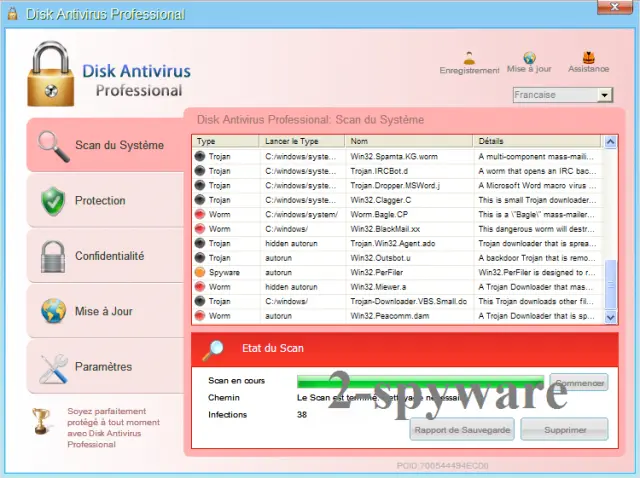
Disk Antivirus Professional: summary
| Detection names | No Microsoft detection name is known |
|---|---|
| Distribution | Not recorded in the old report |
| Damage | Not recorded in the old report |
| Name | Disk Antivirus Professional |
| Type | Rogue antivirus |
| Symptoms | An unknown process in Task Manager |
| Removal | Scan the PC with security software to find and remove the malware and anything installed with it. Fortect scans Windows for malware and repairs the system files and settings it damaged. Remove it nowTo use the full-featured product, you have to purchase a license for Fortect. The scan is free. |
Show 4 more facts
| Files and processes | xxxx.exe |
|---|---|
| Evidence | One write-up by a security site; details still limited |
| First seen | 26 April 2021 |
| Facts checked | 7 October 2026 |
From our report of Apr 2021 · not reviewed since
What Disk Antivirus Professional is
Disk Antivirus Professional is a rogue anti-spyware, which hails from the same family as Smart Fortress 2012, Smart Protection 2012, System Progressive Protection, Personal Shield Pro, Live Security Platinum and many others. It is called WinWebSec.
They all use identical GUIs and apply misleading techniques that are dedicated for the only aim - to swindle the money from PC users. If you are interested in this technique, we must firstly say that you should never believe Disk Antivirus Professional's alerts because they report about invented viruses and security problems.
After doing that and scaring its victim, malware additionally offers to purchase its licensed version and remove those parasites. However, this 'licensed version' doesn't exist and purchasing it only means supporting the scammers. We highly recommend to remove this virus from your computer instead.
Is Disk Antivirus Professional a real security program?
- File:
xxxx.exe
From our report of Apr 2021 · not reviewed since
More from our earlier report on Disk Antivirus Professional
- Disk Antivirus Warning Your PC is still infected with dangerous viruses.
- Activate antivirus protection to prevent data loss and avoid the theft of your credit card details.
- Warning: Your computer is infectedDetected spyware infection!
- The site you are trying visit may harm your computer!
- Your security setting level puts your computer at risk!
- Activate Disk Antivirus Professional, and enable safe web surfing (recommended).
- Ignore warnings and visit that site in the current stat (not recommended).
How Disk Antivirus Professional got on your PC
From our report of Apr 2021 · not reviewed since
Disk Antivirus Professional installs on its target computers secretly and without user's permission asked.
For that, it uses trojan horses that hide inside safely-looking downloads, such as media codecs, fake software updates, spam attachments and similar. Once inside the system, it drops some harmless files there and also includes its own Registry values that should help it to launch as soon as user reboots his computer.
Additionally, this virus begins to show its worst side and floods its victims with annoying pop-up notifications and aggressive pop-up ads. As we have said, they all announce about viruses or simply warn the victim about possible dangers:
As we have already mentioned, all these alerts are useless and bogus, so you should never take them seriously. Instead of paying for Disk Antivirus Professional's license, you should remove this malware and forget about invented problems on your machine.
Some of PC users have reported that they have been blocked when trying to remove infection from the system. If you are one of them, read a detailed removal guide below:
How to remove Disk Antivirus Professional
Nothing it reports is real.
These steps remove it and undo a payment if you made one.
Step 1: Do not pay, and undo a payment if you made one
Nothing that Disk Antivirus Professional says it found needs fixing by it. Close its windows and do not enter card details.
If you bought it, contact your bank or card issuer about a dispute and cancel any renewal, keeping the receipt e-mail as evidence. Uninstalling it from Windows 11 or Windows 10 removes the program but leaves the subscription running.
Full procedure with screenshots: What to do after paying a scammer
Step 2: Uninstall programs you did not mean to install
Disk Antivirus Professional rarely comes alone: it is usually installed by, or together with, a free program. In Windows 11 open Settings > Apps > Installed apps, in Windows 10 Settings > Apps > Apps & features, and sort by install date.
Uninstall every entry from the day the trouble began that you did not install on purpose, for example a download manager, a converter or a browser you never chose.
Keep drivers and entries from Microsoft, Intel, AMD, NVIDIA or your PC's maker unless you are sure.
Full procedure with screenshots: Uninstall a program or app in Windows On uGetFix
Step 3: Remove it from startup
Press Ctrl + Shift + Esc to open Task Manager and select Startup apps (Windows 11) or the Startup tab (Windows 10). Disable entries you do not recognise, especially ones with no publisher or with a name that copies a Windows component.
Right-click an entry and choose Open file location to see where it runs from: programs in
%AppData%or%Temp%deserve a closer look. Some entries are not listed there but in the registry Run keys, which the procedure below shows how to check.Full procedure with screenshots: Stop apps from opening at startup On uGetFix
Step 4: Delete the folders left behind
Uninstalling often leaves the program's folders, and some threats reinstall themselves from them.
Press Windows + R, type
%LocalAppData%and press Enter, then do the same for%AppData%and %ProgramData%, and look for folders named after Disk Antivirus Professional, its publisher or created on the day the problem started.Delete those folders, and check
C:\Program FilesandC:\Program Files (x86)too.If Windows says a file is in use, end it in Task Manager or delete the folder after a restart in Safe Mode. The folders are the same in Windows 11 and Windows 10.
Full procedure with screenshots: Remove what malware leaves behind in Windows
Step 5: Scan the PC, then run the offline scan
A scan finds the parts of Disk Antivirus Professional that the manual steps cannot see. In Windows Security > Virus & threat protection > Scan options, start a Full scan and quarantine what it reports.
Follow it with Microsoft Defender Antivirus (offline scan) > Scan now, which restarts the PC and checks the disk while Windows and the malware are not running.
It takes about 15 minutes and works the same in Windows 11 and Windows 10. If either scan finds something, run the full scan again after removal until it comes back clean.
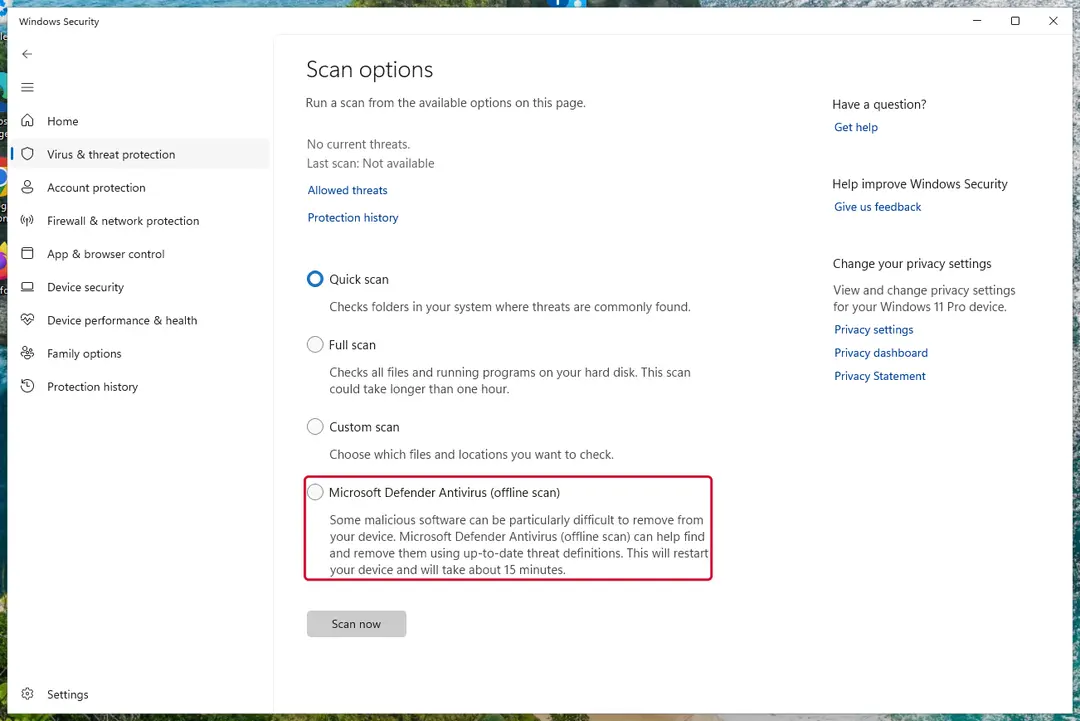
Windows 11: Windows Security > Virus & threat protection > Scan options. Full procedure with screenshots: Run a Microsoft Defender Offline scan
Do not let government spy on you
The government has many issues in regards to tracking users' data and spying on citizens, so you should take this into consideration and learn more about shady information gathering practices.
Avoid any unwanted government tracking or spying by going totally anonymous on the internet.
You can choose a different location when you go online and access any material you want without particular content restrictions. You can easily enjoy internet connection without any risks of being hacked by using VPN.
Control the information that can be accessed by government any other unwanted party and surf online without being spied on. Even if you are not involved in illegal activities or trust your selection of services, platforms, be suspicious for your own security and take precautionary measures by using the VPN service.
Backup files for the later use, in case of the malware attack
Computer users can suffer from data losses due to cyber infections or their own faulty doings.
Ransomware can encrypt and hold files hostage, while unforeseen power cuts might cause a loss of important documents. If you have proper up-to-date backups, you can easily recover after such an incident and get back to work. It is also equally important to update backups on a regular basis so that the newest information remains intact - you can set this process to be performed automatically.
When you have the previous version of every important document or project you can avoid frustration and breakdowns. It comes in handy when malware strikes out of nowhere. Use for the data restoration process.
From our report of Apr 2021 · not reviewed since
HOW TO REMOVE Disk Antivirus Professional?
If you are one of those unlucky people who have already purchased Disk Antivirus Professional, first thing you should do is to contact your credit card company and dispute the charges. Then, remove this rogue anti-spyware from your computer ASAP.
If you can't launch your anti-spyware, use these essential steps:
1. Download . It is designed to run even when it is blocked, just change the name of its executable from xxxx.exe to xxxx.com. 2.
Try registering malware by using this code, which has been working with earlier parasites from WinWebSec: AA39754E-715219CE . It will make your malware think that you have purchased it.
Questions about Disk Antivirus Professional
Is xxxx.exe safe?
It depends on where the file is and who signed it, not on the name. Open Task Manager, go to the Details tab, right-click xxxx.exe and choose Open file location. A file inside Program Files or System32 with a valid digital signature from a known company is usually part of a legitimate program.
A file in AppData, Temp or ProgramData with no signature, especially one that restarts itself after you end it, is suspicious. If you cannot tie the process to anything you installed, uninstall recent unfamiliar programs and run a Microsoft Defender Offline scan.
Can I delete the xxxx.exe file?
Only after you know what it belongs to. If xxxx.exe is part of a program, uninstall that program through Settings instead, so its services and tasks go too. If it belongs to nothing and is unsigned, end the process, disable whatever starts it and then delete its folder.
Do not delete files from the Windows folder or files signed by Microsoft: those are part of the system, and removing them can stop Windows from starting. When in doubt, run a Microsoft Defender scan first and let it decide.
Why does Disk Antivirus Professional look so official?
Because copying the design costs nothing and makes people trust it. The program behind an unfamiliar process called xxxx.exe in Task Manager borrows Windows colours, icons and wording, sometimes even the name of a well-known security brand. None of that gives it access to real security information.
A real alert can be checked in seconds: open Windows Security from the Start menu and look at Protection history. If nothing is listed there, the official-looking window is fake, and the program that draws it is what needs to be removed.
Do I need to reinstall Windows to get rid of Disk Antivirus Professional?
Usually not. A thorough clean-up is enough when the offline scan finds nothing afterwards and you do not see an unfamiliar process called xxxx.exe in Task Manager again. A reset is the safer choice if an attacker had remote control, if security tools were switched off, or if detections come back after every clean-up.
Windows 11 can reset itself without a USB stick under Settings > System > Recovery > Reset this PC. Copy documents and photos out first and scan the copies. A reset does not change passwords or undo stolen data, so the account steps still apply.
What if I paid Disk Antivirus Professional?
Contact your bank or card issuer the same day, explain that the payment went to a fake security program and ask for a chargeback. Keep screenshots of an unfamiliar process called xxxx.exe in Task Manager, the payment receipt and any e-mails.
If you gave card details in the program, ask the bank to block and replace the card. Then uninstall the program and run a full scan in Windows Security. If you also called a number and let someone connect to your PC, uninstall the remote-access tool they used and change your passwords from another device.
What could the caller do while connected to my PC?
Anything you could do. Callers working with fake alerts like Disk Antivirus Professional typically show you Windows logs as "proof", install their own remote tool for later, and steer you to online banking or a gift card purchase. Some add a password to Windows or lock the PC if you refuse to pay.
Remove every remote access program you did not install yourself, check Settings > Accounts > Other users for new accounts, and change important passwords from a clean device. If you cannot be sure what was changed, a reset of Windows is the safe choice.
Someone called offering a refund for Disk Antivirus Professional. Is it genuine?
Almost certainly not. Refund calls are a well-known second stage of scareware and tech support scams. The caller says you are owed money, asks you to install a remote access program to "process" it, then opens your online banking, makes it look as if too much was refunded and asks you to send the difference back.
Hang up. Real refunds go back to the card or PayPal account you paid with, through your bank or the payment provider, and never need remote access or a gift card.
Is my card safe after buying Disk Antivirus Professional?
Treat it as exposed. The order page belongs to the seller of Disk Antivirus Professional, and you cannot know how the number is stored or shared. Ask your bank for a replacement card, which is usually free, and dispute the original charge as a misrepresented product.
Until the new card arrives, check your account daily for small or foreign transactions. If the bank offers alerts for every card payment, turn them on. Keep the receipt and screenshots, because they support the dispute.
Will Fortect remove Disk Antivirus Professional?
Fortect scans Windows for malware and unwanted programs and repairs the system files and settings they change, and its free scan shows what it finds on your PC before you decide anything.
For Disk Antivirus Professional, follow the plan above as well: the browser steps take back permissions and settings that no scanner treats as a threat, and uninstalling the program that brought it removes the source.
Run Microsoft Defender's full scan and, if anything was found, its offline scan as a second opinion. If the symptoms are gone after the plan and both scans are clean, there is nothing more to do.
Sources
- FTC: How to recognize, remove and avoid malware (read October 7, 2026)
- Microsoft Learn: Microsoft Defender Offline (read October 7, 2026)
- Microsoft Learn: How Microsoft names malware (read October 7, 2026)