Bonzi Buddy virus (Virus Removal Instructions) - Oct 2020 update
Bonzi Buddy virus Removal Guide
What is Bonzi Buddy virus?
Bonzi Buddy is one of the most infamous adware with spyware traits, which has been shut down in 2004, but renewed download emerge in 2020

BonziBuddy is the name used to describe an adware-type application developed by Joe and Jay Bonzi. The software has been released in 1999 and worked similarly to Office Assistant. The two characters Peedy (green parrot) and Bonzi (purple ape) were introduced as virtual desktop assistants were interacting with the users in a form of text box or speech. However, due to the mixed traits of adware, malware, spyware, and browser hijacker, multiple cybersecurity vendors included it into the virus database as adware or spyware[1]. The final point to the BonziBuddy adware assistance was the official Federal Trade Commission statement fining the developers $75,000 in fees for spyware activities against children under the age 9.
Although the software was discontinued in 2004 and the reports about the closure of the official website's closure were released in 2008, BonziBuddy adware remains reminiscent. In 2016, a file-encrypting virus called BonziBuddy ransomware has been revealed on the landscape spreading as a second payload of a trojan infection. Moreover, in spring 2020 cybersecurity experts form novirus.uk[2] draw their attention to the suspicious fake website (fightfasr731.weebly.com) offering a download of Bonzi Buddy app for Macs.
| Malware summary | |
| Name | BonziBuddy / Bonzi Buddy |
| Release date | 1999 the initial release. The second update emerged in 2000, while in 2004 the software has been discontinued |
| Classification | The software belongs to the adware and Potentially Unwanted Programs (PUP) category. However, it exhibited spyware traits and was even fined for violating the Children's Online Privacy Protection Act. |
| Distribution | The adware used to have an official download website, which has been shut down in 2008. However, experts warn that some malware may try to mimic the BonziBuddy assistant and spread it in a freeware bundle. Besides, spam emails should be treated with caution to evade infiltration of related ransomware |
| Detection | Adware.Win32.Bonzo.2!c, Trojan.Generic.IS.543530, Not-a-virus:AdWare.Win32.Bonzo.f, Win32:Adware-gen [Adw], ApplicUnwnt@#13y1vkoet2u8a, PUA:Win32/Presenoker, etc. |
| Symptoms | The original application used desktop helper characters Peedy or Bonzi, which kept displaying text messages and voice interaction directly on the desktop. However, one of its additional traits was to display commercial ads or banners imitating Windows security alerts. It may also trigger high CPU consumption |
| Danger level | Medium. The software is known for displaying intrusive advertisements, which contain an idle close button and, therefore, cannot be closed. However, the adware tends to function as spyware and may collect some pieces of Personally Identifiable Information (PII) |
| Removal | BonziBuddy malware removal rely on a professional anti-virus program. Additional malware components may be left unnoticed on the system upon manual removal |
| Malware damage | Malware can compromise legitimate Windows system files and processes, thus causing slowdowns, crashes, and errors. Upon removal, the system required optimization and the FortectIntego can be of use this time. |
The Bonzi Buddy app has been promoted in an appealing manner and had a relatively wide community of users at that time. Jokes, facts, songs, conversations, or download management services provided by BonziBuddy were treated as handy and entertaining by many users of those days, and, in fact, some people are still looking[3] for a download of this tool. Unfortunately, most of them were not aware of the fact that the software has hidden functions and intentions.
He will explore the Internet with you as your very own friend and sidekick! He can talk, walk, joke, browse, search, e-mail, and download like no other friend you've ever had! He even has the ability to compare prices on the products you love and help you save money! Best of all, he's FREE!
First of all, it has been described as a free application, which is a false claim used to tempt users for a download. In fact, the free version exhibited samples and demos only, and users were regularly offered to pay for the new modules.
In addition to that, the application was reported for impersonating Windows security warnings, which contained false claims about the broadcasted IP addresses[4]. The purpose of such notifications is not known, though there are speculations that they may be used for distributing affiliate software.
However, intrusive advertising campaign and Windows slowdowns are not the only side effects of the BonziBuddy malware. It tended to drop cookies and spyware software that may track browsing and system-related information, as well as some pieces of personally identifiable information. This fact has been proven when the developers have been convicted to pay a $75,000 fine for privacy violation of children under 9.

If you are dealing with an adware-type program that displays a purple ape on your desktop, delivers ads, compromises web browser's settings, or perform other unwanted activities, take corresponding actions and get rid of it. BonziBuddy removal is not a difficult task. You can try to eliminate it manually with the help of a guide positioned below.
Nevertheless, this adware and spyware mix has been rated 6th on a list of “The Top 10 Most Annoying Tech Products”[5] for a reason. The adware may be used for promoting other malware or use supportive files and processes that may be difficult to detect and eliminate. For this reason, we recommend you remove BonziBuddy virus with a powerful anti-virus program, for example Malwarebytes or SpyHunter 5Combo Cleaner.
Revived strains of Bonzi Buddy malware manifests on the market in 2020
Having these facts in mind, security experts warn online society to beware of the apps carrying names like BonziBuddy or Bonzi Buddy. Although they can hardly be the same as the ancient desktop assistant featuring malware traits, there is a potential danger to download even more malicious tools.
Despite the official application has been discontinued in 2004, several questionable download websites, including Tucows downloads, keep promoting the purple ape app. Besides, the official website bonzi.link also seems to be active. Our security experts checked the domain and found out that both download links and ads positioned on this domain are active. Clicking on BonziBuddy ads redirect the web browser to a domain promoting Honey coupon extension for Chrome, which is a highly questionable tool resembling adware.
Moreover, initially designed for Windows OS only, the infamous adware now seems to have switched its target to Mac OS and iOS users. One of the main promotion sources is Twickd, which represents the BonziBuddy for Mac iOS as a personal buddy that can talk to users personally and “turn your icons slowly into bananas.” The renewed app is under the active development stage, so it's not yet clear will it mimic the behavior of its predecessor or emerge as a malware-free application.

Two ways to get adware – download it reasonably or bundled with freeware
Adware and other PUPs are promoted in several ways and we will briefly explain each of them. However, before pointing out the possible adware distribution techniques, we'd like to stress the fact that not all programs that have official websites, a well-prepared description, and strong marketing are reliable.
- In the case of the adware described above, most of the downloads have been registered directly from its official website. It means that people get tempted by vivid descriptions of tools and download free apps willingly.
- Nevertheless, unwanted programs are frequently attached to freeware and shareware downloads. For the monetization purposes, free software developers append additional plug-ins, add-ons under Quick installation setup and grant their access by placing a tick next to the user's consent. That's why it's important to opt for Advanced installation and untick pre-selected additional tools.
- Questionable ads may redirect to adware download websites. If the system is infected by adware or browser hijacker, web browser may continuously redirect to suspicious websites promoting malware.
- Other third-party websites. Questionable download websites like download, cnet, Softonic, and many others may promote free apps that are classified as potentially unwanted due to advertising or spyware activities.
In general, the only way to stay away from unwanted programs that once installed start disrupting activities and compromise system's performance is to render consciousness. Make small research on apps that you are planning to download and do not trust unreliable sources. Besides, render a professional security tool, which will warn you when an unwanted program seeks to enter.
A full guide on how to remove Bonzi Buddy from Windows and Mac
Despite the fact that BonziBuddy malware has been discontinued more than 15 years ago, there are questionable downloads of the supposedly renewed or rogue variants. If you noticed questionable activities on your PC, for example, ads by BonziBuddy, a purple ape character on your desktop and visited websites, web browser's new tab replaced by an unknown domain, etc., you may need help.
One of the ways to remove BonziBuddy adware is to analyze apps on the system and eliminate the adware installer. After that resetting web browser's settings is advisable to disable a plug-in and tracking cookies.
However, manual BonziBuddy removal may fail due to additional adware components. Windows Registry may contain the related key, as well as some supporting components that may be run in Task Manager. In this case, a full system scan with a powerful AV tool may help. Besides, as the last point, restore the system to the state prior to adware infection with an optimization tool FortectIntego.
You may remove virus damage with a help of FortectIntego. SpyHunter 5Combo Cleaner and Malwarebytes are recommended to detect potentially unwanted programs and viruses with all their files and registry entries that are related to them.
Getting rid of Bonzi Buddy virus. Follow these steps
Uninstall from Windows
In case you accidentally downloaded BonziBuddy virus on your PC, follow these steps to successfully eliminate it.
-
Click Start → Control Panel → Programs and Features (if you are Windows XP user, click on Add/Remove Programs).

-
If you are Windows 10 / Windows 8 user, then right-click in the lower left corner of the screen. Once Quick Access Menu shows up, select Control Panel and Uninstall a Program.

-
Uninstall Bonzi Buddy and related programs
Here, look for Bonzi Buddy or any other recently installed suspicious programs. -
Uninstall them and click OK to save these changes.


Delete from macOS
Although the original application has been developed for Windows, currently some new variants were found promoting the adware for Macs. Therefore, our team has submitted a detailed guide on how to remove BonziBuddy from Mac OS easily.
-
If you are using OS X, click Go button at the top left of the screen and select Applications.

-
Wait until you see Applications folder and look for Bonzi Buddy or any other suspicious programs on it. Now right click on every of such entries and select Move to Trash.


Remove from Microsoft Edge
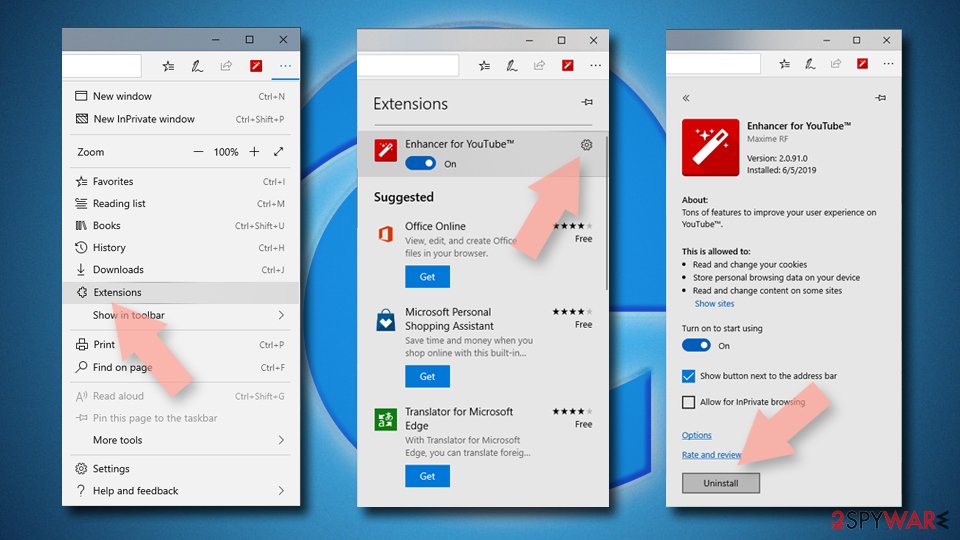
Delete unwanted extensions from MS Edge:
- Select Menu (three horizontal dots at the top-right of the browser window) and pick Extensions.
- From the list, pick the extension and click on the Gear icon.
- Click Remove.

Clear cookies and other browser data:
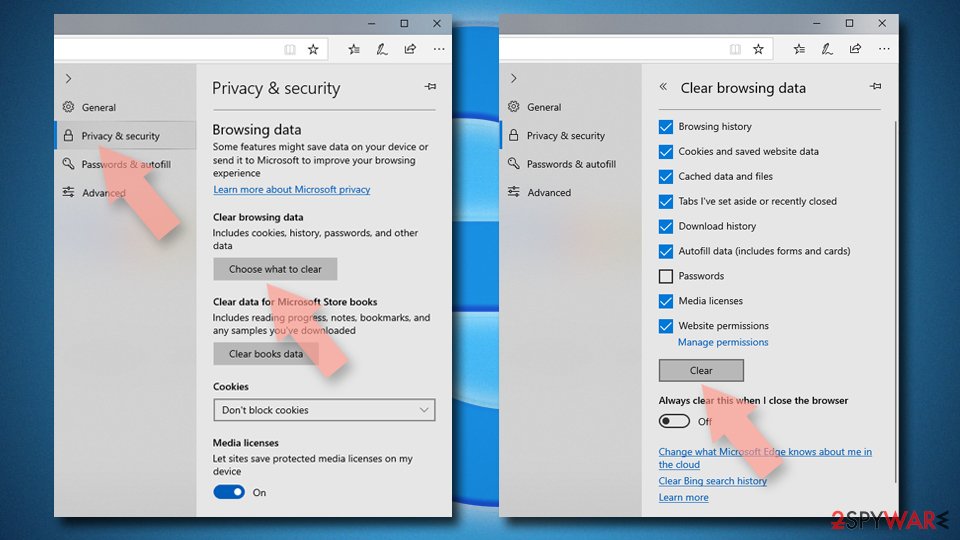
- Click on the Menu (three horizontal dots at the top-right of the browser window) and select Settings > Privacy, search, and services..
- Under Clear browsing data, pick Choose what to clear.
- Select Cookies and other site data and Cached images and files. (apart from passwords, although you might want to include Media licenses as well, if applicable) and click on Clear.

Restore new tab and homepage settings:
- Click the menu icon and choose Settings.
- Then find On startup section.
- Click Remove next to any suspicious startup page.
Reset MS Edge if the above steps did not work:
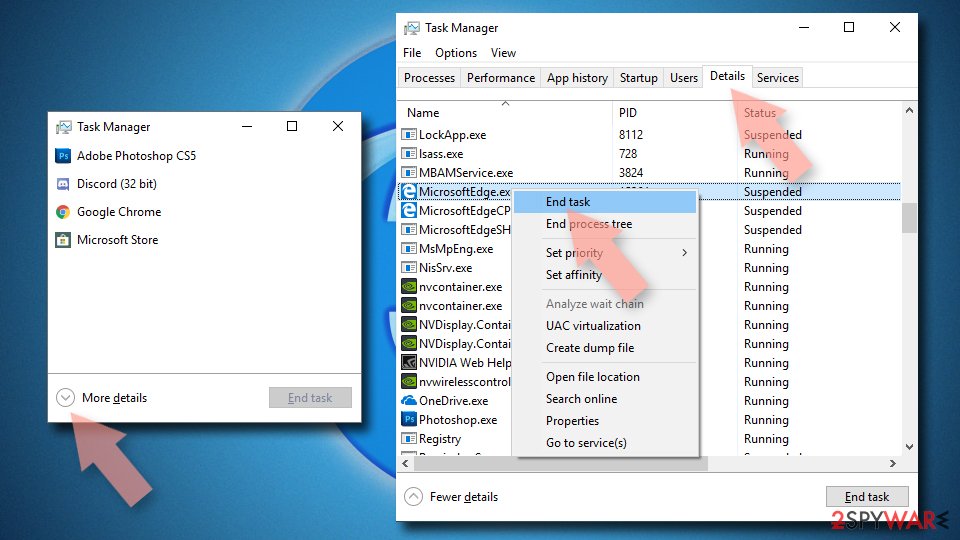
- Press on Ctrl + Shift + Esc to open Task Manager.
- Click on More details arrow at the bottom of the window.
- Select Details tab.
- Now scroll down and locate every entry with Microsoft Edge name in it. Right-click on each of them and select End Task to stop MS Edge from running.

Instructions for Chromium-based Edge
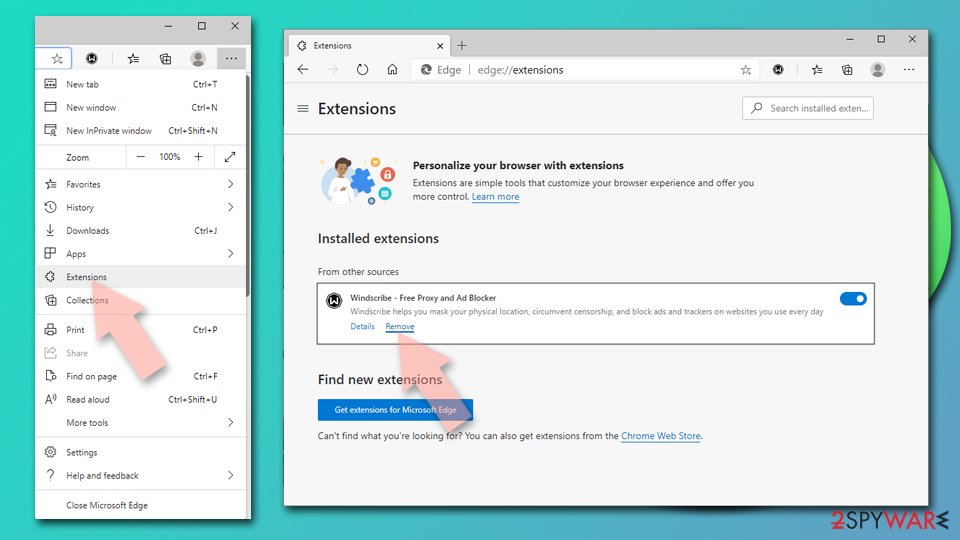
Delete extensions from MS Edge (Chromium):
- Open Edge and click select Settings > Extensions.
- Delete unwanted extensions by clicking Remove.

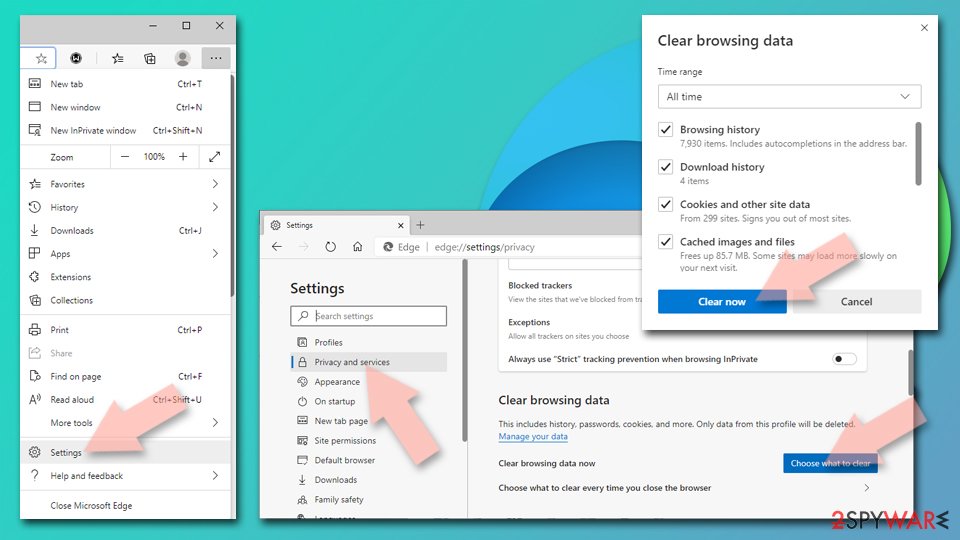
Clear cache and site data:
- Click on Menu and go to Settings.
- Select Privacy, search and services.
- Under Clear browsing data, pick Choose what to clear.
- Under Time range, pick All time.
- Select Clear now.

Reset Chromium-based MS Edge:
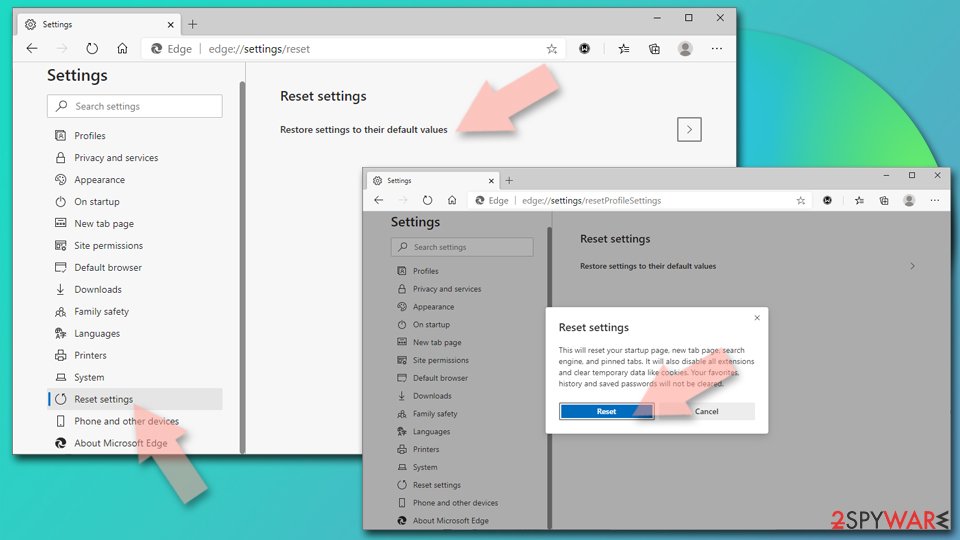
- Click on Menu and select Settings.
- On the left side, pick Reset settings.
- Select Restore settings to their default values.
- Confirm with Reset.
- This will disable extensions and reset startup pages but will not delete bookmarks, saved passwords, or browsing history.

Remove from Mozilla Firefox (FF)
Upon adware removal, restore your web browser's settings to disable add-on, toolbars, and other unwanted entries.
Remove dangerous extensions:
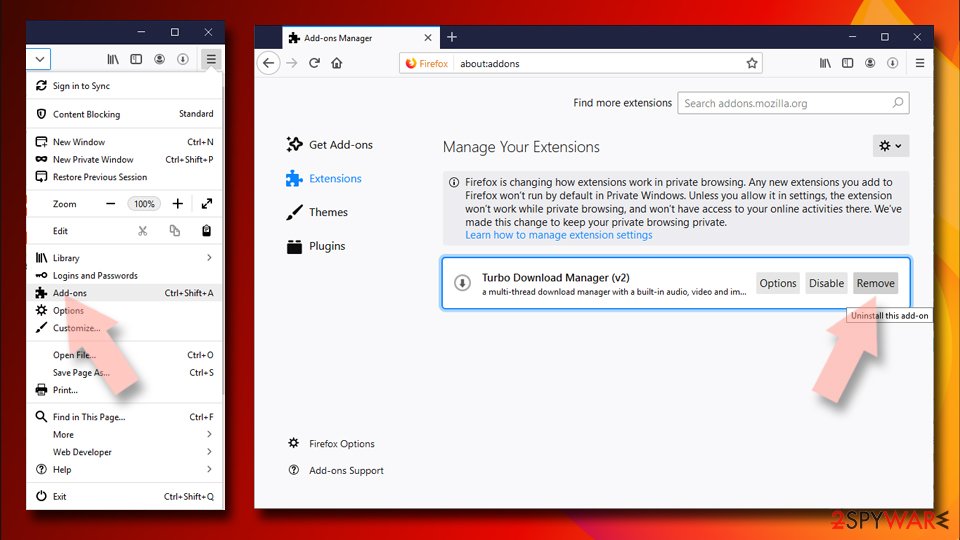
- Open Mozilla Firefox browser and click on the Menu (three horizontal lines at the top-right of the window).
- Select Add-ons.
- In here, select the unwanted extension and click Remove.

Reset the homepage:
- Click three horizontal lines at the top right corner to open the menu.
- Choose Settings.
- Under Home, set your preferred homepage and new tab settings.
Clear cookies and site data:
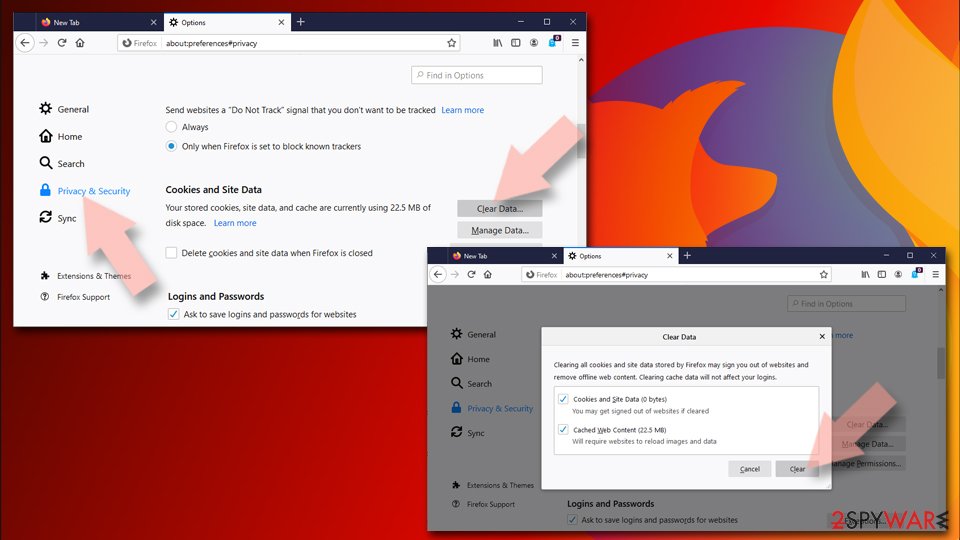
- Click Menu and pick Settings.
- Go to Privacy & Security section.
- Scroll down to locate Cookies and Site Data.
- Click on Clear Data…
- Select Cookies and Site Data and Temporary cached files and pages, then click Clear.

Reset Mozilla Firefox
If clearing the browser as explained above did not help, reset Mozilla Firefox:
- Open Mozilla Firefox browser and click the Menu.
- Go to Help and then choose Troubleshooting Information.
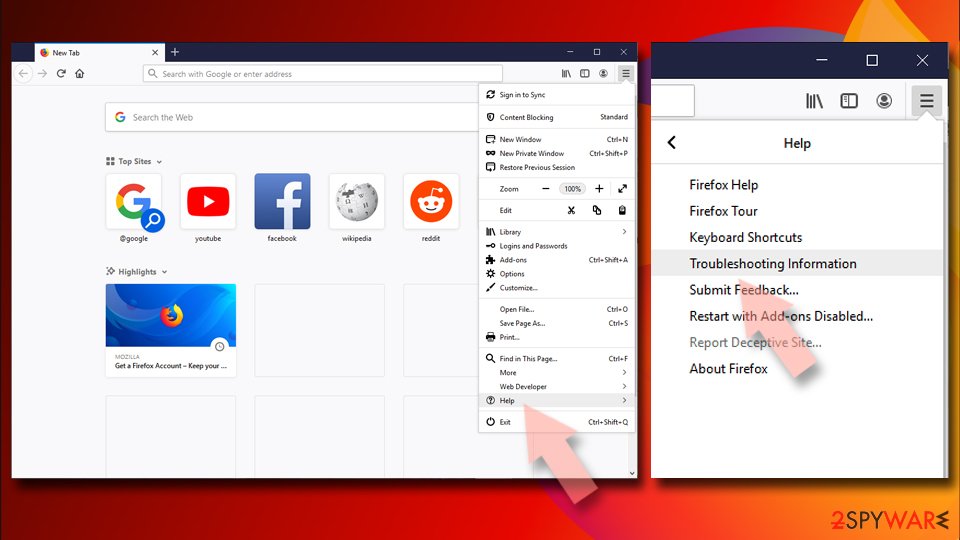
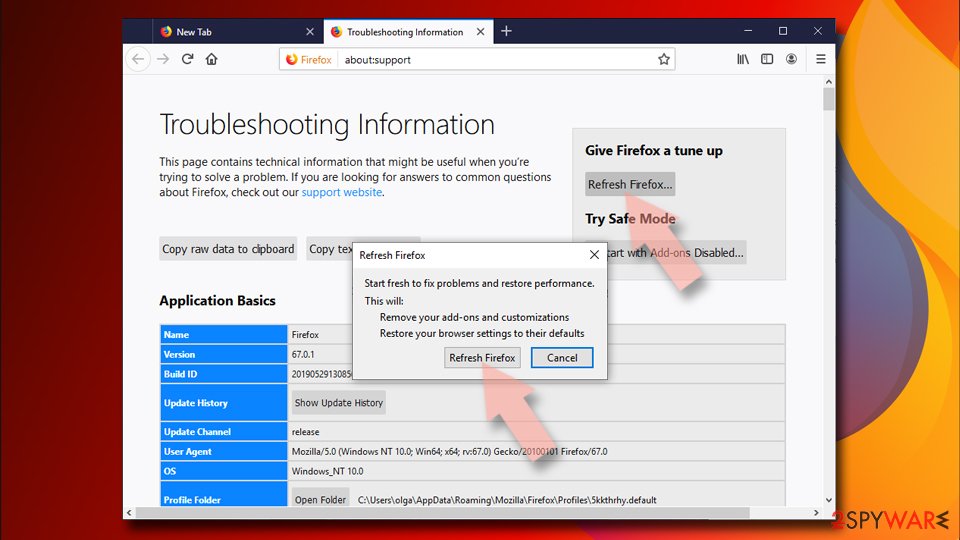
- Under Give Firefox a tune up section, click on Refresh Firefox…
- Once the pop-up shows up, confirm the action by pressing on Refresh Firefox.


Remove from Google Chrome
Reset Google Chrome to terminateBonziBuddy ads.
Delete malicious extensions from Google Chrome:
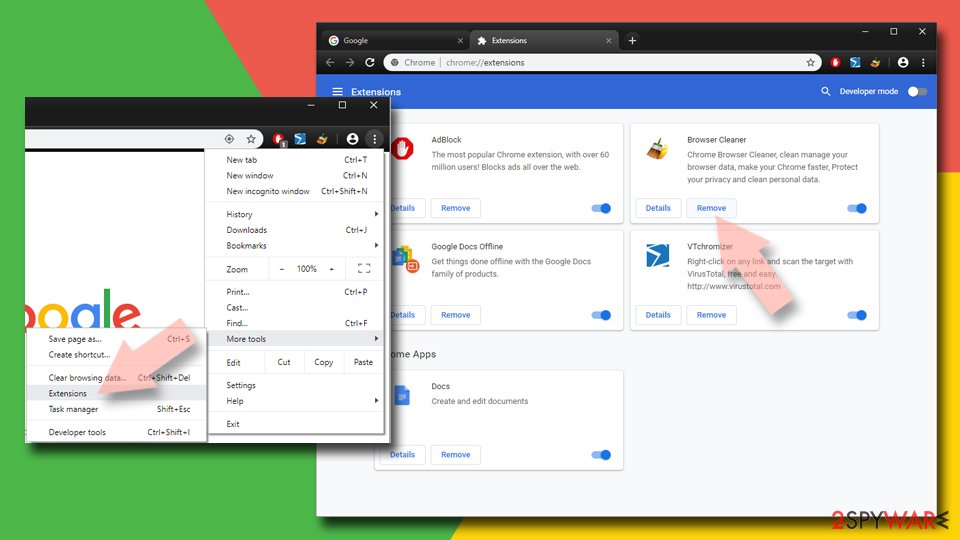
- Open Google Chrome, click on the Menu (three vertical dots at the top-right corner) and select More tools > Extensions.
- In the newly opened window, you will see all the installed extensions. Uninstall all suspicious extensions related to the unwanted program by clicking Remove.

Clear cache and web data from Chrome:
- Click on Menu and pick Settings.
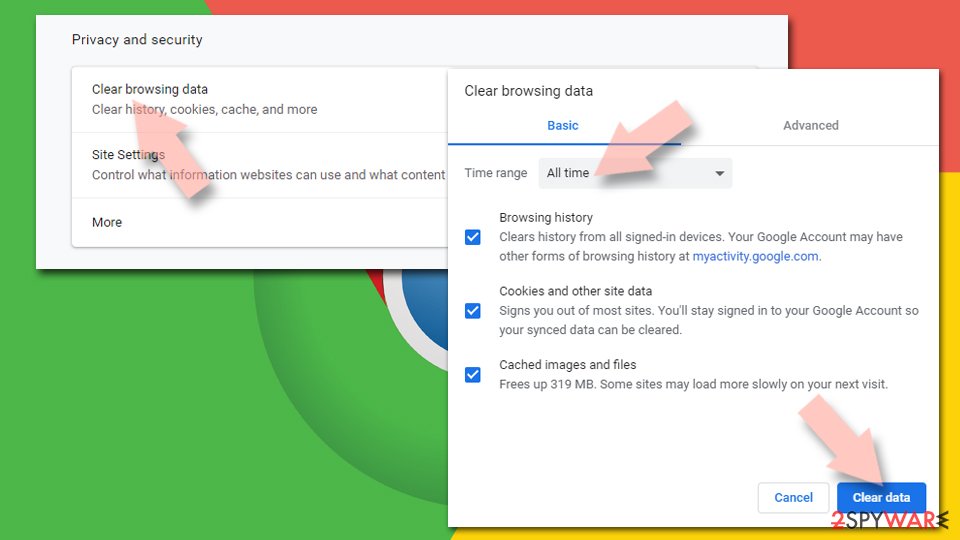
- Under Privacy and security, select Clear browsing data.
- Select Browsing history, Cookies and other site data, as well as Cached images and files.
- Click Clear data.

Change your homepage:
- Click menu and choose Settings.
- Look for a suspicious site in the On startup section.
- Click on Open a specific or set of pages and click on three dots to find the Remove option.
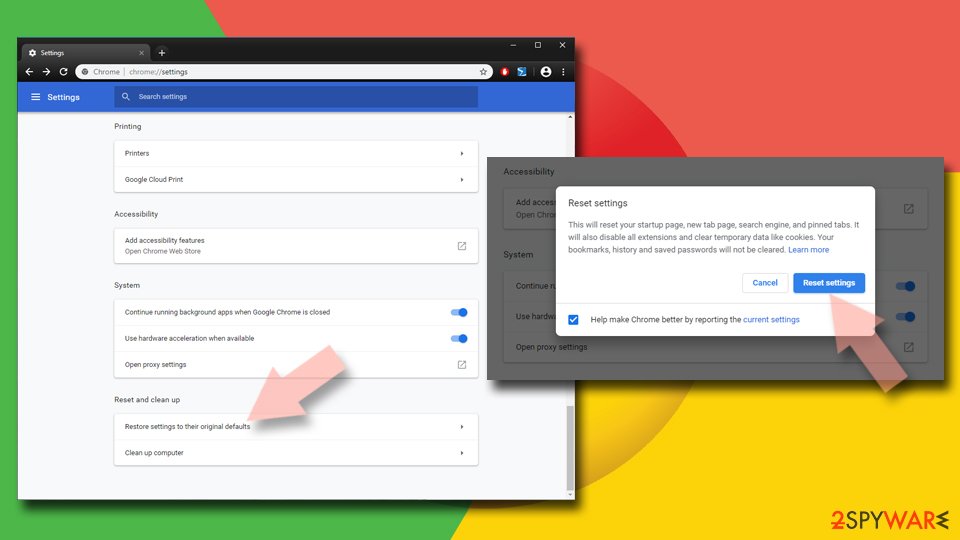
Reset Google Chrome:
If the previous methods did not help you, reset Google Chrome to eliminate all the unwanted components:
- Click on Menu and select Settings.
- In the Settings, scroll down and click Advanced.
- Scroll down and locate Reset and clean up section.
- Now click Restore settings to their original defaults.
- Confirm with Reset settings.

Delete from Safari
-
Remove dangerous extensions
Open Safari web browser and click on Safari in menu at the top left of the screen. Once you do this, select Preferences.
-
Here, select Extensions and look for Bonzi Buddy or other suspicious entries. Click on the Uninstall button to get rid each of them.

-
Reset Safari
Open Safari browser and click on Safari in menu section at the top left of the screen. Here, select Reset Safari....
-
Now you will see a detailed dialog window filled with reset options. All of those options are usually checked, but you can specify which of them you want to reset. Click the Reset button to complete Bonzi Buddy removal process.


After uninstalling this potentially unwanted program (PUP) and fixing each of your web browsers, we recommend you to scan your PC system with a reputable anti-spyware. This will help you to get rid of Bonzi Buddy registry traces and will also identify related parasites or possible malware infections on your computer. For that you can use our top-rated malware remover: FortectIntego, SpyHunter 5Combo Cleaner or Malwarebytes.
How to prevent from getting adware
Access your website securely from any location
When you work on the domain, site, blog, or different project that requires constant management, content creation, or coding, you may need to connect to the server and content management service more often. The best solution for creating a tighter network could be a dedicated/fixed IP address.
If you make your IP address static and set to your device, you can connect to the CMS from any location and do not create any additional issues for the server or network manager that needs to monitor connections and activities. VPN software providers like Private Internet Access can help you with such settings and offer the option to control the online reputation and manage projects easily from any part of the world.
Recover files after data-affecting malware attacks
While much of the data can be accidentally deleted due to various reasons, malware is one of the main culprits that can cause loss of pictures, documents, videos, and other important files. More serious malware infections lead to significant data loss when your documents, system files, and images get encrypted. In particular, ransomware is is a type of malware that focuses on such functions, so your files become useless without an ability to access them.
Even though there is little to no possibility to recover after file-locking threats, some applications have features for data recovery in the system. In some cases, Data Recovery Pro can also help to recover at least some portion of your data after data-locking virus infection or general cyber infection.

If this free guide helped you and you are satisfied with our service, please consider making a donation to keep this service alive. Even a smallest amount will be appreciated.
- ^ Bon.zip. VirusTotal. Free URL and file scanner.
- ^ Security and spyware news. NoVirus. Virus and spyware news.
- ^ Is bonzi buddy safe to download now?. Reddit. The biggest collection of forums.
- ^ BonziBuddy. Wikipedia. The free encyclopedia.
- ^ Dan Tynan. The 20 Most Annoying Tech Products. PC World from IDG. Tech-related news.